
📖 Overview
The Help menu in the admin portal lets your support team send issues straight to Hussle Tier 2 support, contact your Customer Success Manager (CSM), or browse how-to articles. Requests from your support team get higher priority in Hussle's ticket queue.
👤 Who this is for
Brand admin or brand support team (Tier 1) · Desktop (web browser) · Admin portal access required
📋 Before you begin
- Before contacting support, collect the affected user's name, email, login or username, device, and app version.
🔧 Steps
- Click Help (top right of the admin portal).
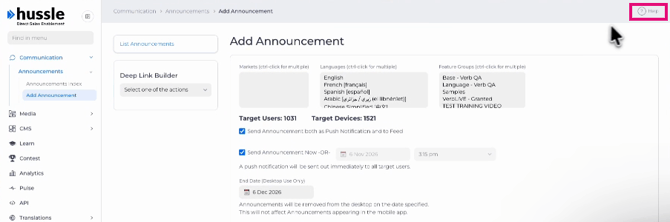
- In How can we assist you?, choose one:
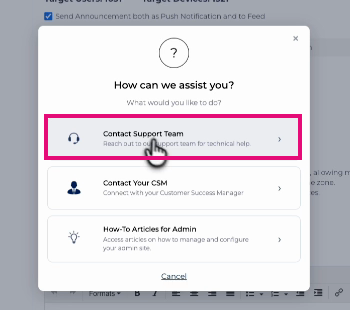
- Contact Support Team: opens the Tier 2 support form.
- Contact Your CSM: reach your Customer Success Manager.
- How-To Articles for Admin: browse the knowledge base.
- If you chose Contact Support Team, fill in the affected user's details, their device and app version, and a description under How can we help?. Attach screenshots if you have them.
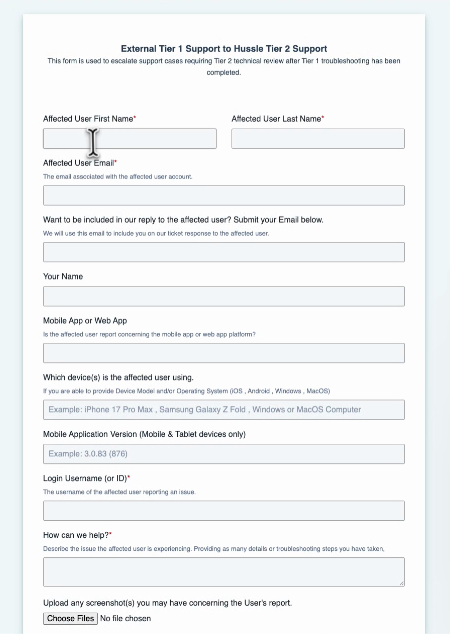
- Submit the form.
✅ What happens next
Your request goes into Hussle's ticket queue with Tier 2 priority. Hussle may follow up with you for more details about the affected user.
⚠️ Common issues
Support asks for more information
Some details were missing from the form. Include the user's device, app version and the steps to reproduce the issue.
🔗 Related articles
Still need help? Contact your CSM.